Z
TradZonly
Subscriber Guide
دليل المشترك
Welcome — Setup in 7 steps

Structure before the move. Always.

Thank you for joining TradZonly. This guide walks you through linking your account, claiming access, and applying the strategy on your charts — start to finish, in under five minutes.

مرحباً بك — الإعداد في ٧ خطوات

الهيكل قبل الحركة. دائماً.

شكراً لانضمامك إلى TradZonly. يرشدك هذا الدليل إلى ربط حسابك، والحصول على الصلاحية، وتطبيق الاستراتيجية على الرسوم البيانية — من البداية إلى النهاية، في أقل من خمس دقائق.

Time requiredالوقت المطلوب~ 5 min
You'll needستحتاج إلىTradingView accountحساب TradingView
OutcomeالنتيجةStrategy live on chartالاستراتيجية فعّالة على الرسم

The seven steps

الخطوات السبع

01 — 07 ٠١ — ٠٧
01STEP / 07خطوة / ٠٧

Open the TradZonly community portal

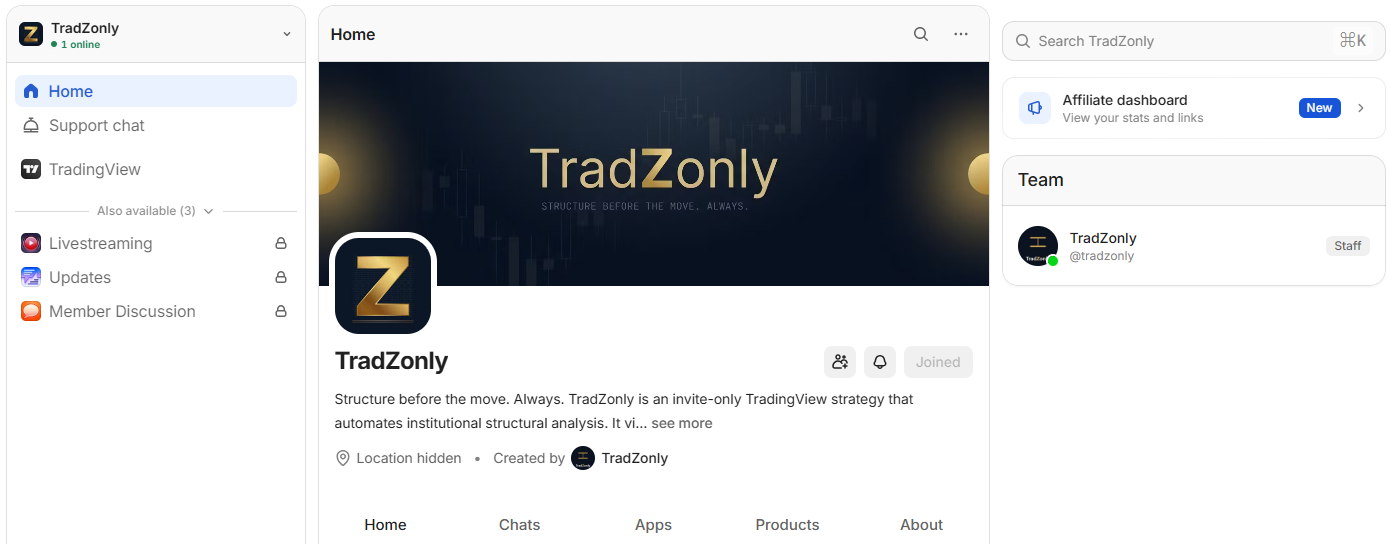
Sign in to the community platform where TradZonly is hosted. From the left navigation, select the TradZonly workspace to enter the member home.

  • Click Home in the left sidebar.
  • Confirm the workspace banner shows TradZonly.
  • Verify your status reads Joined.

افتح بوابة مجتمع TradZonly

سجّل الدخول إلى المنصة التي يستضيف عليها TradZonly مجتمعه. من القائمة الجانبية، اختر مساحة TradZonly للوصول إلى الصفحة الرئيسية للأعضاء.

  • اضغط على Home في القائمة الجانبية.
  • تأكد أن البانر يعرض اسم TradZonly.
  • تحقق من ظهور حالتك كـ Joined.
FIG. 01 — PORTAL ENTRY شكل ٠١ — الدخول إلى البوابة Portal
1
2
3
02STEP / 07خطوة / ٠٧

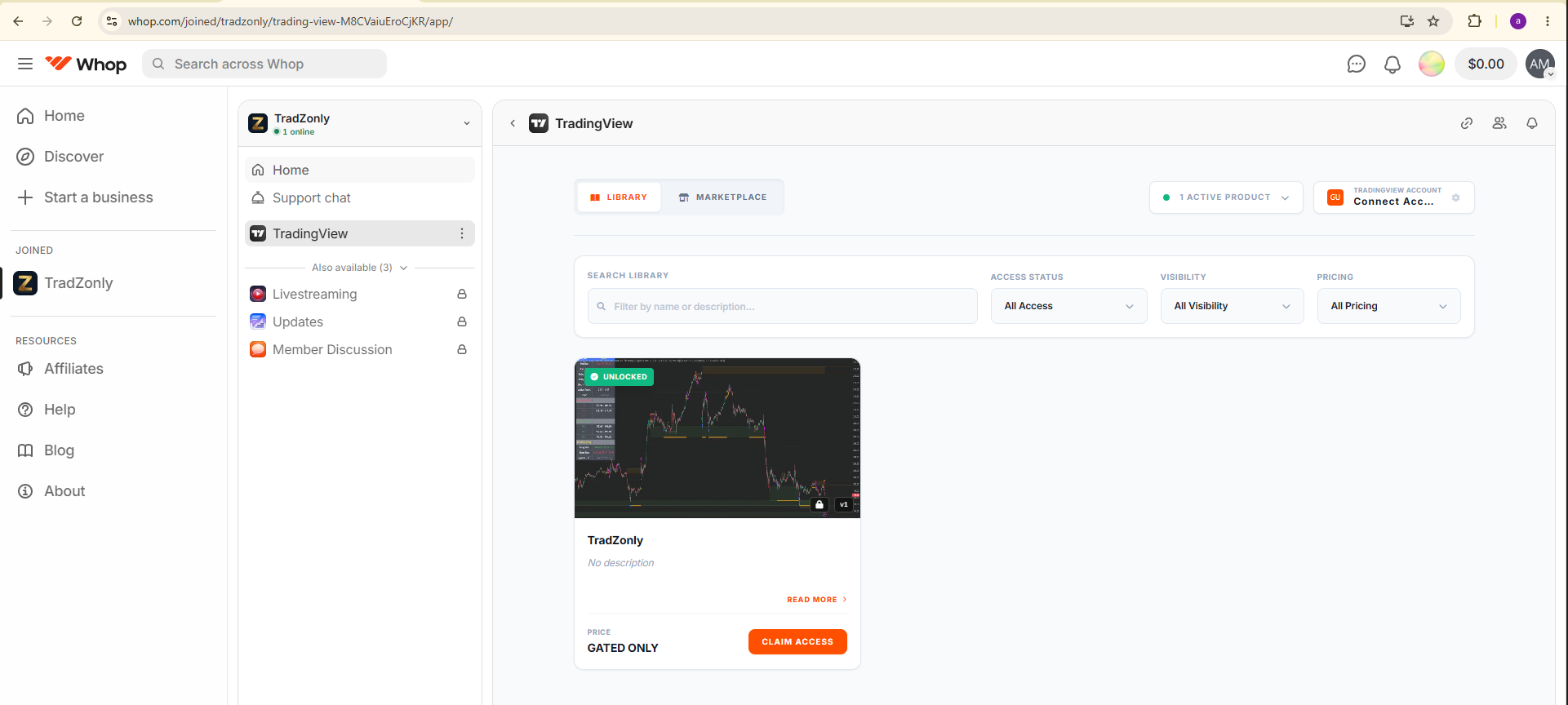
Navigate to the TradingView module

From the side menu, open the TradingView tab. You'll see the strategy library with the TradZonly product card. The card is currently unlocked but not yet linked.

  • Click the TradingView tab in the sidebar.
  • Make sure the Library view is selected (not Marketplace).
  • Locate the TradZonly card with the green Unlocked badge.

انتقل إلى قسم TradingView

من القائمة الجانبية، افتح تبويب TradingView. ستظهر مكتبة الاستراتيجيات مع بطاقة TradZonly، وهي حالياً غير مقفلة ولم تُربط بعد.

  • اضغط على تبويب TradingView في القائمة الجانبية.
  • تأكد من اختيار عرض Library (وليس Marketplace).
  • حدد بطاقة TradZonly ذات الشارة الخضراء Unlocked.
FIG. 02 — STRATEGY LIBRARY شكل ٠٢ — مكتبة الاستراتيجيات Library
1
2
3
03STEP / 07خطوة / ٠٧

Click "Claim Access"

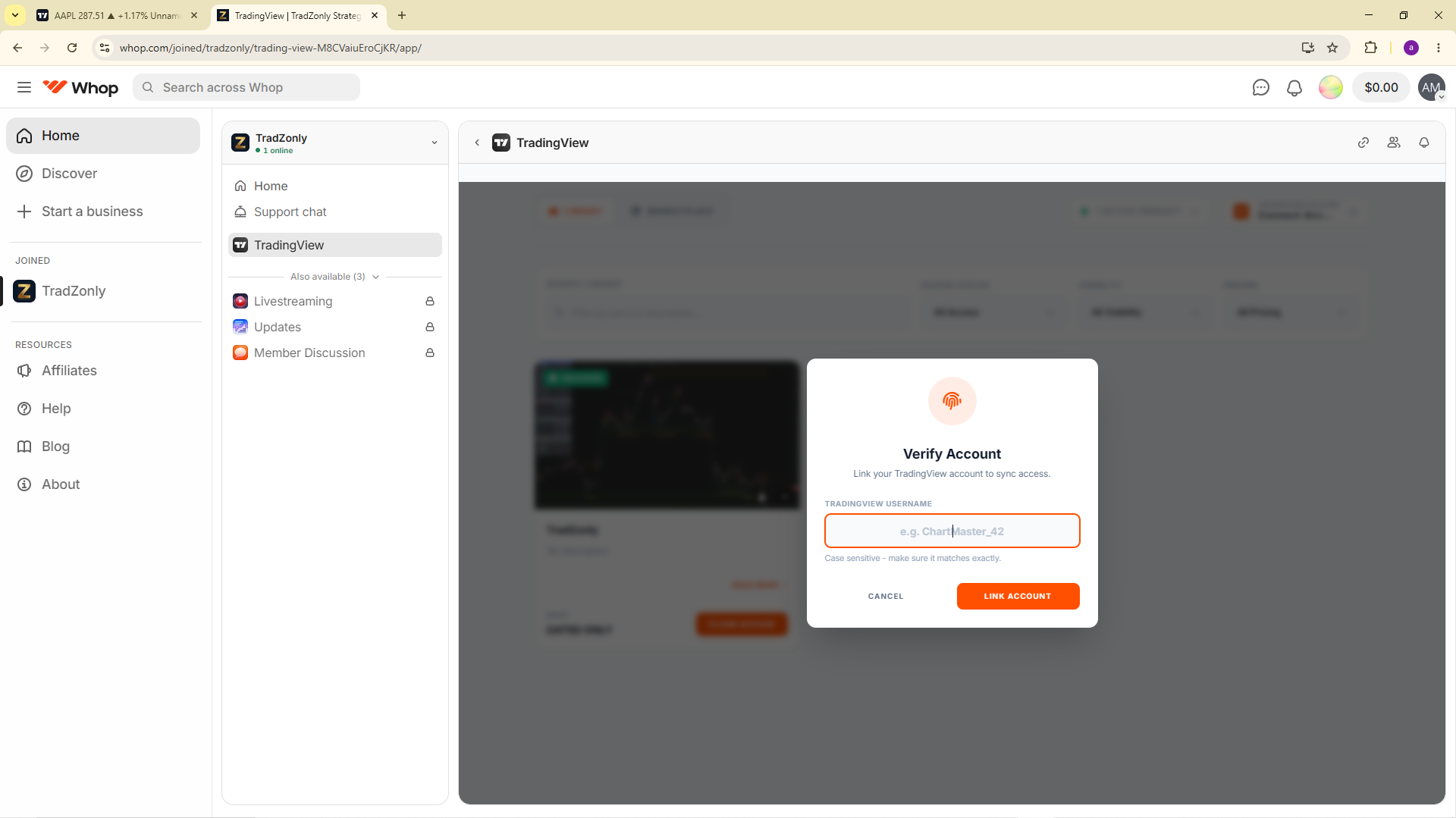
On the TradZonly card, press Claim Access. A verification dialog will open asking for your TradingView username — this is how the script gets pushed to your chart.

  • Press the orange Claim Access button.
  • The Verify Account dialog opens.
  • Have your TradingView username ready (case-sensitive).
ImportantCapitalisation must match exactly.

اضغط على "Claim Access"

في بطاقة TradZonly، اضغط على زر Claim Access. ستفتح نافذة تحقق تطلب اسم المستخدم في TradingView.

  • اضغط على زر Claim Access البرتقالي.
  • ستفتح نافذة Verify Account.
  • جهّز اسم مستخدم TradingView (حساس للأحرف).
مهميجب أن تطابق الأحرف الكبيرة/الصغيرة تماماً.
FIG. 03 — CLAIM ACCESS شكل ٠٣ — طلب الصلاحية Claim
1
2
3
04STEP / 07خطوة / ٠٧

Enter your TradingView username

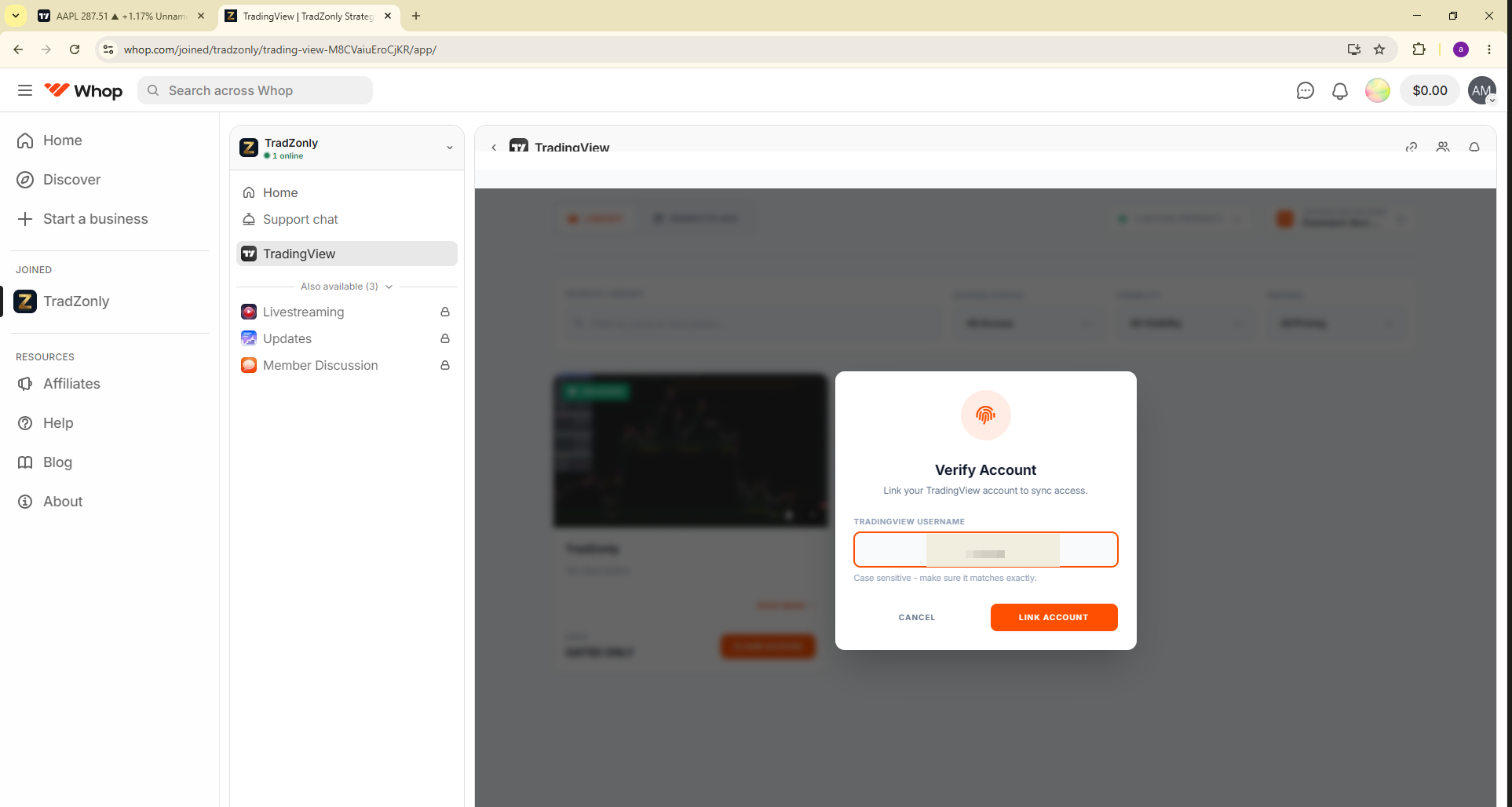
Type your exact TradingView username into the field — not your email, not your display name. Then press Link Account.

  • Type your TradingView username in the field.
  • Double-check spelling and capitalisation.
  • Press the orange Link Account button.
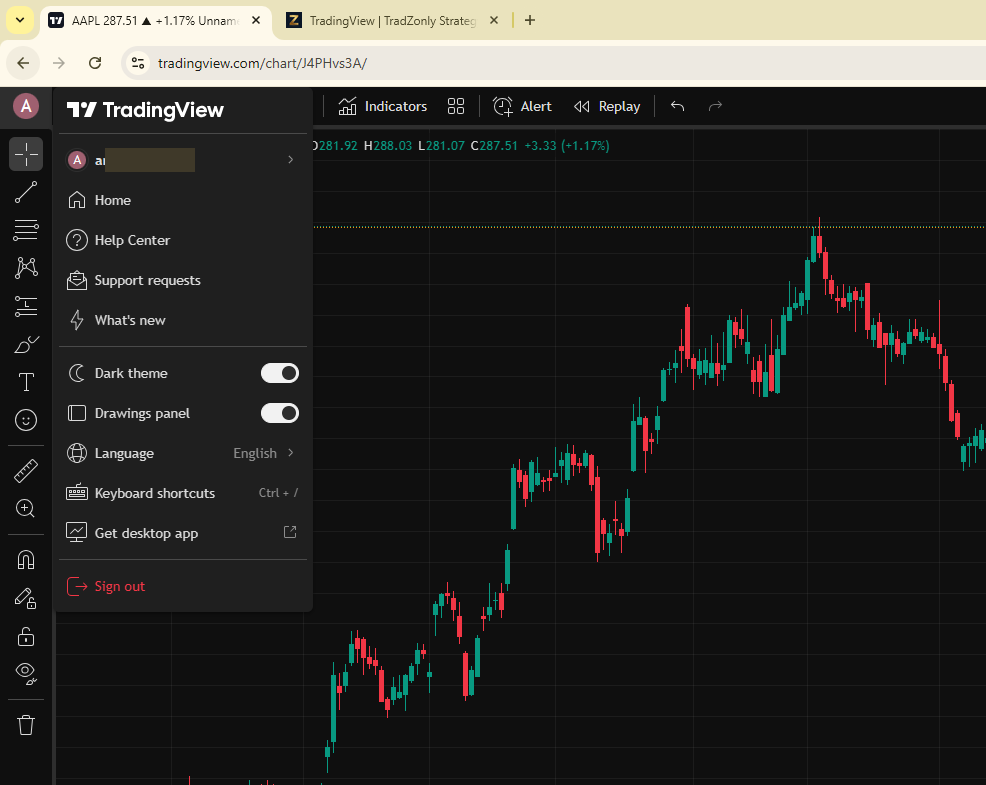
Find itTop-left avatar in TradingView shows your username.

أدخل اسم المستخدم في TradingView

اكتب اسم المستخدم بدقة — وليس البريد ولا الاسم المعروض. ثم اضغط Link Account.

  • اكتب اسم المستخدم في الحقل.
  • تحقق من التهجئة وحالة الأحرف.
  • اضغط على الزر البرتقالي Link Account.
أين أجدهصورة الملف الشخصي أعلى يسار TradingView تعرض اسم المستخدم.
FIG. 04 — USERNAME ENTRY شكل ٠٤ — إدخال اسم المستخدم Username
1
2
3
05STEP / 07خطوة / ٠٧

Confirm "Active" status

The card status changes from Claim Access to Active, and your linked TradingView handle appears in the top-right indicator.

  • Verify the 1 Active Product indicator at the top.
  • Confirm your username is shown beside TradingView Account.
  • The card button now reads Active in green.
Stuck?If the status hasn't flipped within 60s, refresh the page or recheck your username.

تأكد من حالة "Active"

تتغير حالة البطاقة من Claim Access إلى Active، ويظهر اسم المستخدم في المؤشر العلوي.

  • تحقق من ظهور 1 Active Product في الأعلى.
  • تأكد من ظهور اسم المستخدم بجانب TradingView Account.
  • زر البطاقة أصبح يعرض Active باللون الأخضر.
إن لم تتحدث؟أعد تحميل الصفحة أو راجع اسم المستخدم.
FIG. 05 — ACCESS GRANTED شكل ٠٥ — تم منح الصلاحية Active
1
2
3
06STEP / 07خطوة / ٠٧

Open TradingView and add the indicator

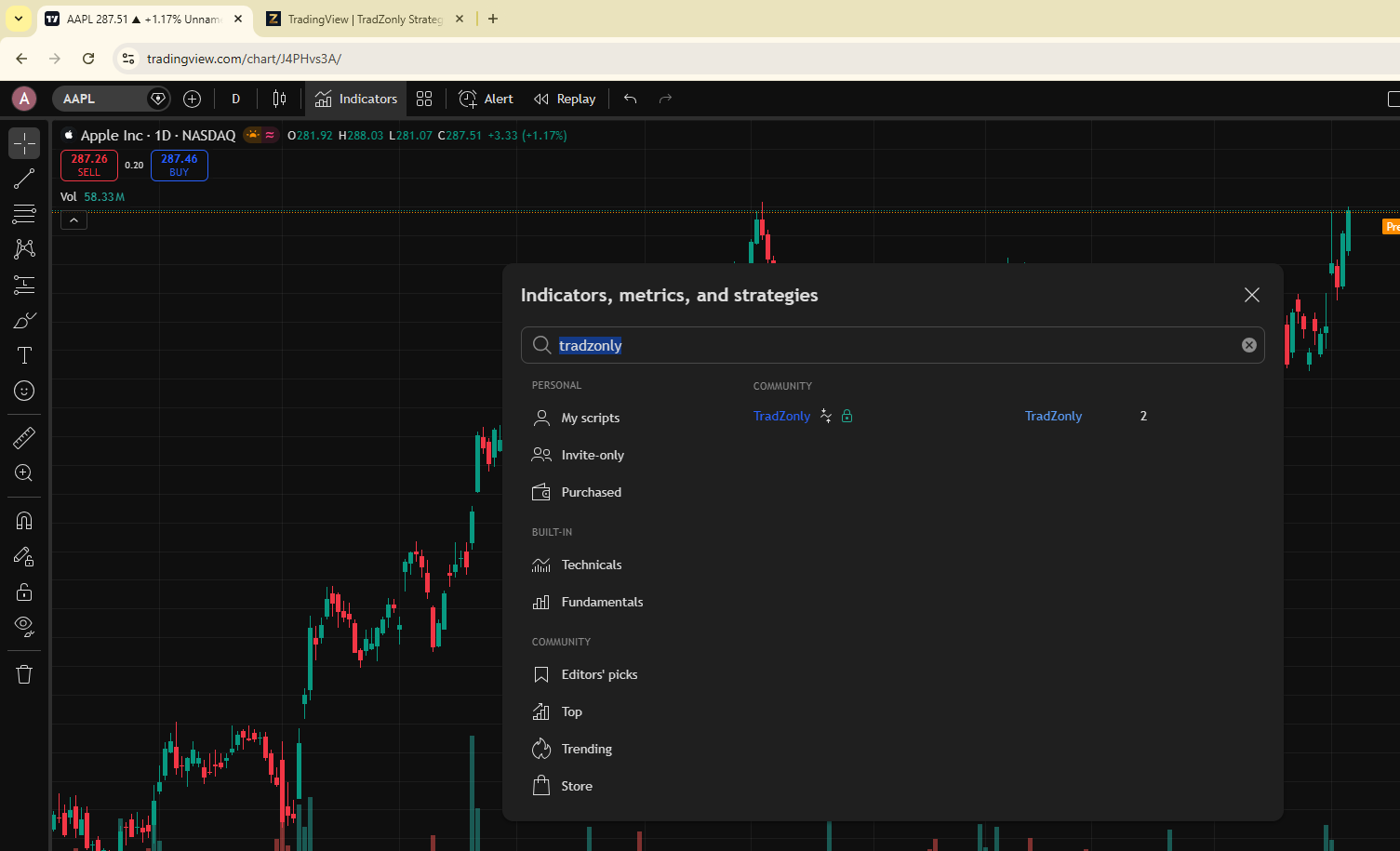
Go to TradingView, sign in with the same account you linked. Click Indicators in the toolbar, then search for tradzonly. The strategy appears under Invite-only. Click it to add to your chart.

  • Open tradingview.com on any chart.
  • Verify the avatar shows the same username you linked.
  • Click Indicators in the top toolbar.
  • Type tradzonly in the search field.
  • Select the result with the lock icon (Invite-only).

افتح TradingView وأضف المؤشر

افتح TradingView بـنفس الحساب الذي ربطته. اضغط Indicators، ثم ابحث عن tradzonly. ستظهر الاستراتيجية ضمن Invite-only.

  • افتح tradingview.com في أي رسم بياني.
  • تأكد أن الصورة الشخصية تعرض نفس اسم المستخدم.
  • اضغط على Indicators في الشريط العلوي.
  • اكتب tradzonly في حقل البحث.
  • اختر النتيجة التي تحمل أيقونة القفل (Invite-only).
FIG. 06A — VERIFY ACCOUNT شكل ٠٦أ — تحقق الحساب TV menu
1
2
FIG. 06B — SEARCH INDICATORS شكل ٠٦ب — بحث المؤشرات Indicators
1
2
3
07STEP / 07خطوة / ٠٧

Read the structure

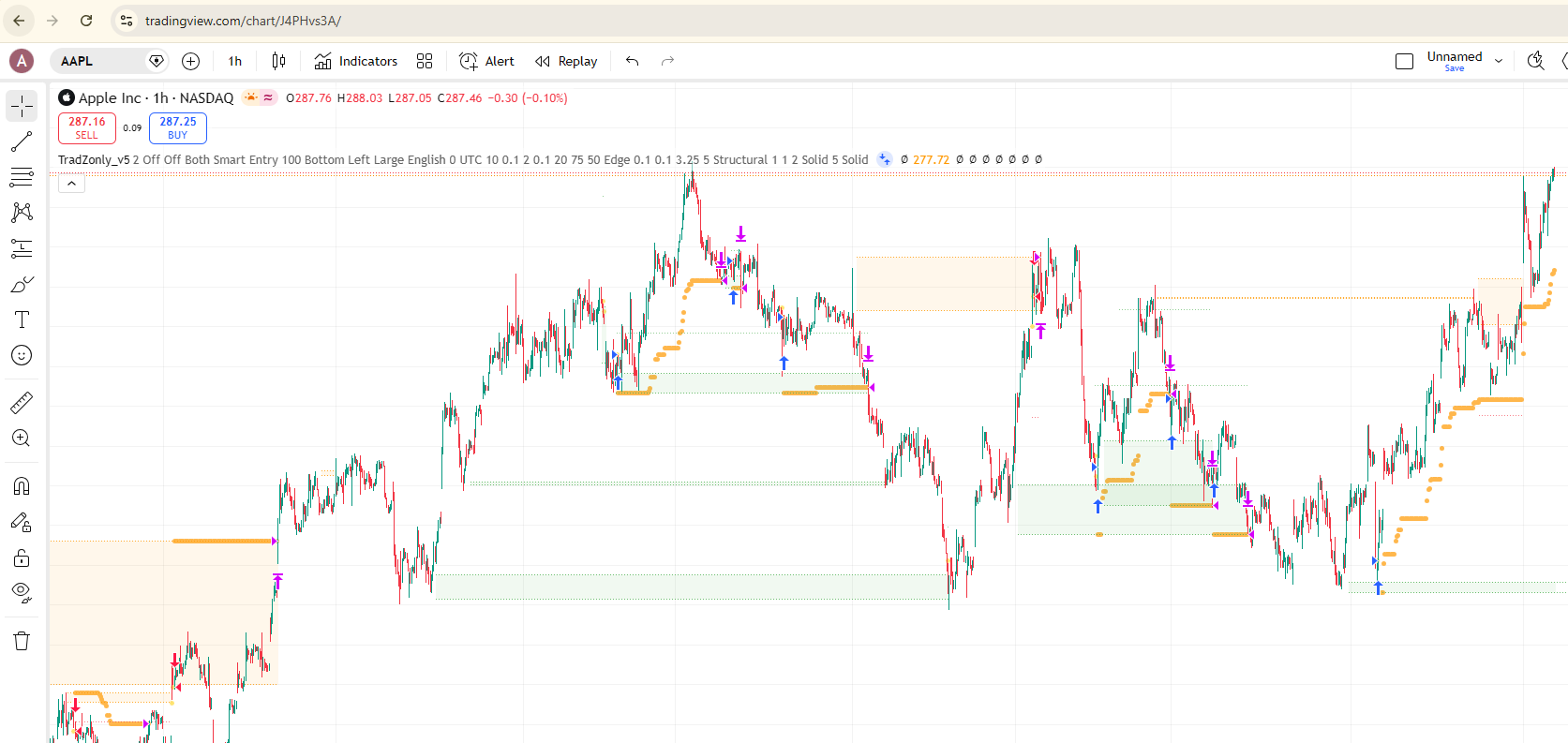
The strategy plots structural levels, entry markers, and demand/supply zones directly on your chart. Let structure speak before the move.

  • Confirm TradZonly_v5 appears in the indicator label.
  • Arrows mark structural entry/exit signals.
  • Shaded zones highlight key demand and supply.
  • Adjust parameters from the indicator settings as documented.
Need help?Open Support chat from the community sidebar.

اقرأ الهيكل

تعرض الاستراتيجية المستويات الهيكلية، إشارات الدخول، ومناطق الطلب/العرض مباشرةً على الرسم.

  • تأكد من ظهور TradZonly_v5 في تسمية المؤشر.
  • الأسهم تمثّل إشارات الدخول والخروج الهيكلية.
  • المناطق المظللة تُبرز الطلب والعرض.
  • اضبط الإعدادات من خصائص المؤشر حسب التوثيق.
تحتاج مساعدة؟افتح Support chat من القائمة الجانبية للمجتمع.
FIG. 07 — STRATEGY APPLIED شكل ٠٧ — الاستراتيجية مطبّقة Applied
1
2
3
YOU'RE SET أنت جاهز

Welcome to the structure.

أهلاً بك في الهيكل.

Your subscription is live, your account is linked, and the strategy is on your chart. The community, livestreams, and updates are unlocked next — see you inside.

اشتراكك فعّال، حسابك مربوط، والاستراتيجية تعمل على رسومك البيانية. المجتمع والبث المباشر والتحديثات في انتظارك — نراك في الداخل.